

Python transformation reference
Lookup reference for Python transformations in Keboola — runtime environment and limits, file locations, script requirements, installing packages, reading and writing CSV, and backend sizes.
Reference material for Python transformations. To create and run one, see the how-to.
Environment
Section titled “Environment”The Python script runs in an isolated environment. The Python version is updated regularly, a few weeks after the official release; updates are announced on the status page.
Limits
Section titled “Limits”| Resource | Limit |
|---|---|
| Memory | 8 GB |
| Max running time | 6 hours |
| CPU | Equivalent of two 2.3 GHz processors |
File locations
Section titled “File locations”- The script is compiled to
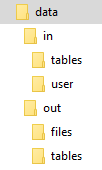
/data/script.py. - Mapped input/output tables: relative
in/tables/file.csv,out/tables/file.csvor absolute/data/in/tables/file.csv,/data/out/tables/file.csv. - Downloaded files:
in/files/(or/data/in/files/). - Temporary files:
/tmp/. Do not use/data/for files you don’t want exchanged with Keboola.
See the full Common Interface specification.
Script requirements
Section titled “Script requirements”Python is sensitive to indentation — do not mix tabs and spaces. Files are assumed UTF-8 (# coding=utf-8 is not needed). No main function is required:
print("Hello Keboola")If you define a main function, do not wrap it in if __name__ == '__main__': (it will not run) — just call it:
def main():    print("Hello Keboola")
main()
You can organize the script into blocks.
Packages
Section titled “Packages”List extra packages in the UI; they are installed with pip from PyPI. Some packages have external dependencies that may not be available — contact support if you hit problems. After install, you still need to import them.
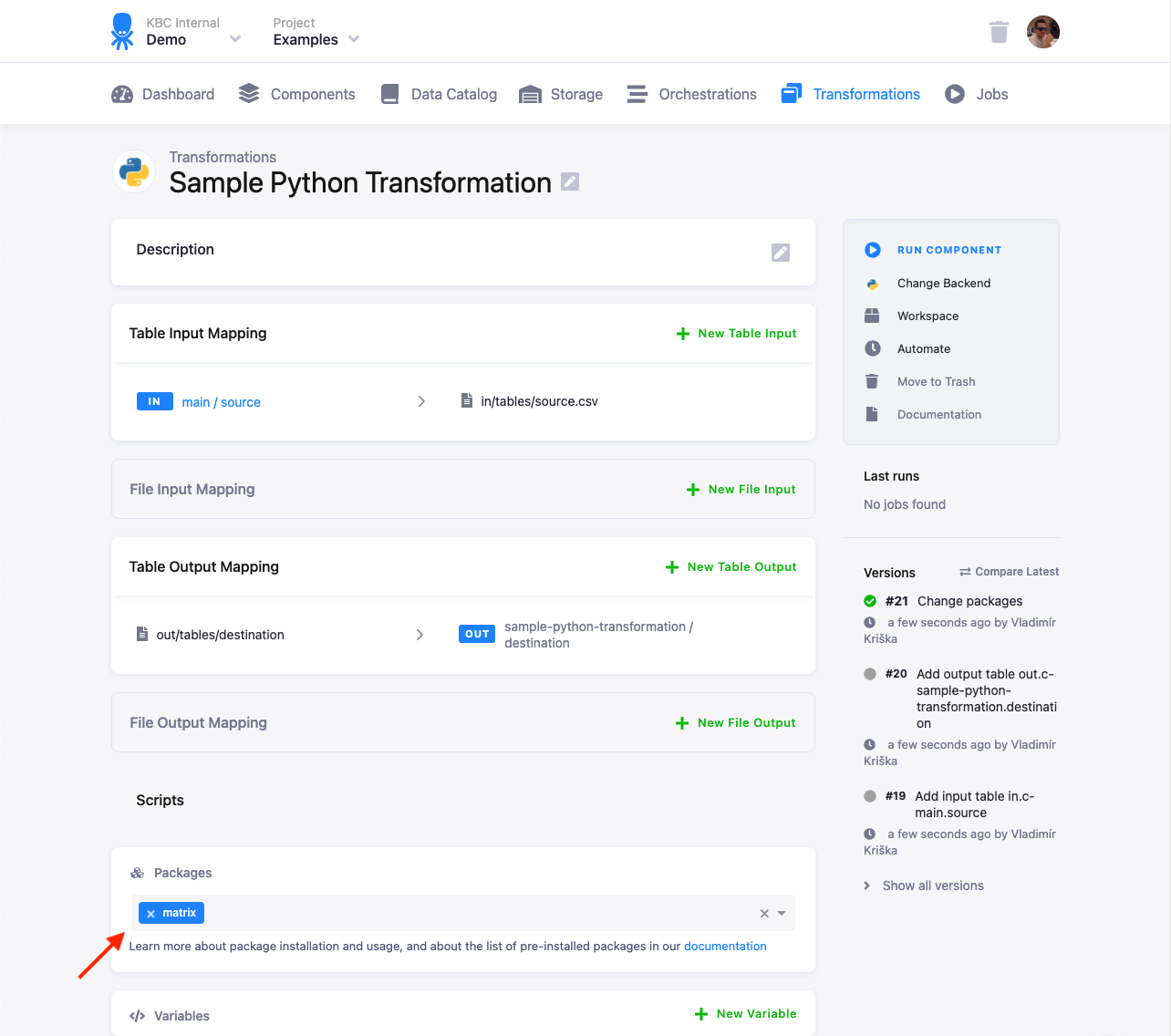
The latest versions are installed at release time. To pin a version, force-reinstall it from your code:
import subprocessimport syssubprocess.call([sys.executable, '-m', 'pip', 'install', '--disable-pip-version-check', '--no-cache-dir', '--force-reinstall', 'pandas==0.20.0'])Some packages are preinstalled and don’t need to be listed.
Reading and writing CSV
Section titled “Reading and writing CSV”Input tables arrive as CSV in in/tables/; write outputs to out/tables/. Read with the standard csv module; specifying formatting options explicitly is recommended. Process line-by-line for memory efficiency.
Dictionaries (named columns):
import csv
csvlt = '\n'csvdel = ','csvquo = '"'with open('in/tables/source.csv', mode='rt', encoding='utf-8') as in_file, open('out/tables/result.csv', mode='wt', encoding='utf-8') as out_file:    writer = csv.DictWriter(out_file, fieldnames=['col1', 'col2'], lineterminator=csvlt, delimiter=csvdel, quotechar=csvquo)    writer.writeheader()
    lazy_lines = (line.replace('\0', '') for line in in_file)    reader = csv.DictReader(lazy_lines, lineterminator=csvlt, delimiter=csvdel, quotechar=csvquo)    for row in reader:        writer.writerow({'col1': row['first'] + 'ping', 'col2': int(row['second']) * 42})
The generator lazy_lines = (line.replace('\0', '') for line in in_file) strips null characters. Always use encoding='utf-8'.
Lists (numbered columns):
import csv
with open('/data/in/tables/source.csv', mode='rt', encoding='utf-8') as in_file, open('/data/out/tables/result.csv', mode='wt', encoding='utf-8') as out_file:    writer = csv.writer(out_file, lineterminator='\n', delimiter=',', quotechar='"')    lazy_lines = (line.replace('\0', '') for line in in_file)    reader = csv.reader(lazy_lines, lineterminator='\n', delimiter=',', quotechar='"')    for row in reader:        writer.writerow([row[0] + 'ping', int(row[1]) * 42])
Preinstalled kbc dialect (simplifies the format options):
import csv
with open('/data/in/tables/source.csv', mode='rt', encoding='utf-8') as in_file, open('/data/out/tables/result.csv', mode='wt', encoding='utf-8') as out_file:    lazy_lines = (line.replace('\0', '') for line in in_file)    reader = csv.DictReader(lazy_lines, dialect='kbc')    writer = csv.DictWriter(out_file, dialect='kbc', fieldnames=reader.fieldnames)    writer.writeheader()    for row in reader:        writer.writerow({"first": row['first'] + 'ping', "second": int(row['second']) * 42})
To register the kbc dialect locally: csv.register_dialect('kbc', lineterminator='\n', delimiter=',', quotechar='"').
Backend sizes (dynamic backends)
Section titled “Backend sizes (dynamic backends)”A larger backend allocates more resources for long or heavy transformations. Available sizes:
| Size | |
|---|---|
| XSmall | |
| Small | Default |
| Medium | |
| Large |
Scaling up impacts time-credit consumption. Dynamic backends are not available on the Free Plan (Pay As You Go).